USPS Customs Forms
What Are USPS® Customs Forms?
U.S. Postal Service® mail headed to an international destination, or sent via Military Mail, and weighing more than 16 ounces requires the use of a customs form. Customs forms summarize the contents of the package and identify the value of the shipped items. These forms make it possible for the destination country to examine mail and allow its entry without having to open and inspect each item one by one.
The USPS has two different types of customs forms for international mail: PS Form 2976 and PS Form 2976-A. The weight, value, mail class and destination of the package determine which form to use. If you are a Stamps.com customer, the software will automatically determine the appropriate form.

International Mail Class
PS Form 2976 Customs Declaration – CN 22 (short form)
PS 2976-A Customs Declaration & Dispatch Note – CP72 (long form)
First Class Mail International – Large Envelope (Flats)
PS Form 2976 Customs Declaration – CN 22 (short form) :
No Customs Form needed if under 16 oz. containing only documents
PS 2976-A Customs Declaration & Dispatch Note – CP72 (long form) :
No Customs Form needed if under 16 oz. containing only documents
First Class Package International Service
PS Form 2976 Customs Declaration – CN 22 (short form) :
PS 2976-A Customs Declaration & Dispatch Note – CP72 (long form) :
Priority Mail International Flat Rate Envelope (Legal or Regular)
PS Form 2976 Customs Declaration – CN 22 (short form) :
PS 2976-A Customs Declaration & Dispatch Note – CP72 (long form) :
Priority Mail International Flat Rate Box (Small)
PS Form 2976 Customs Declaration – CN 22 (short form) :
PS 2976-A Customs Declaration & Dispatch Note – CP72 (long form) :
Priority Mail International Flat Rate Box (Medium or Large)
PS Form 2976 Customs Declaration – CN 22 (short form) :
PS 2976-A Customs Declaration & Dispatch Note – CP72 (long form) :
Priority Mail International Package
PS Form 2976 Customs Declaration – CN 22 (short form) :
PS 2976-A Customs Declaration & Dispatch Note – CP72 (long form) :
Priority Mail Express International (All packages, envelopes & Flat Rate boxes)
PS Form 2976 Customs Declaration – CN 22 (short form) :
(under $400 value)
PS 2976-A Customs Declaration & Dispatch Note – CP72 (long form) :
(over $400 value)
APO/FPO/DPO
PS Form 2976 Customs Declaration – CN 22 (short form) :
(15 oz. or less)
PS 2976-A Customs Declaration & Dispatch Note – CP72 (long form) :
(16 oz. or more)
All Other Packages
PS Form 2976 Customs Declaration – CN 22 (short form) :
PS 2976-A Customs Declaration & Dispatch Note – CP72 (long form) :
There are three ways to obtain customs forms. You can pick them up from the Post Office, order them by mail, or print them from your computer using an internet-based postage service such as Stamps.com.
The Benefits of International Shipping with Stamps.com
Stamps.com makes international shipping easier than ever. With Stamps.com’s automated forms, your staff will never have to hunt for the appropriate customs forms at the Post Office. You can fill out all of your needed forms directly through the Stamps.com interface, and then print your postage, address labels, and customs forms in one easy step.
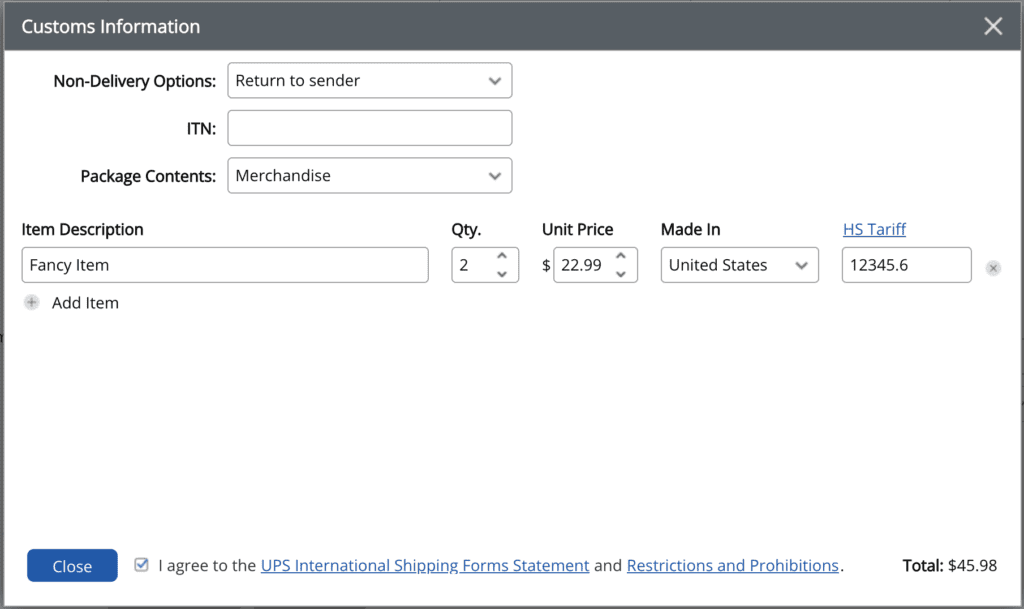
To complete USPS customs forms using Stamps.com, you’ll be asked to supply some basic information, including whether your package is a commercial sample, gift, document, return, or other. You’ll also be asked to specify the quantity of each unique item, along with a description, value, weight, country of origin, and HS tariff number (if applicable and known).
Stamps.com’s automated customs forms eliminate the confusion of selecting which form to use becayse the software automatically generates the appropriate form based on the information you provide. You can print both customs forms and international postage using Stamps.com, so you won’t need to travel to the post office at any point during the shipping process, making your mailing and shipping much more efficient.
$60 in free postage and supplies when you sign up!
- $5 in free postage added to your account
- 5 lb digital scale (only pay for S&H)
- Free mailing and shipping supplies kit
- Risk-free 30-day trial
- No long-term contracts. Cancel anytime.